Metrics: The Four Golden Signals
Metrics: The Four Golden Signals
The problem: you can emit a thousand metrics and still not know whether the order service is healthy. A wall of dials buys you nothing during a rush except more dashboards no one has time to read. You need a small set that actually predicts user pain.
Google's SRE book names four, and they're enough to start (Google, Site Reliability Engineering, 2016). Latency is how long requests take, split by success and failure so a fast stream of failed orders doesn't hide in the average. Traffic is demand: orders per second, the assignment queue depth as the dinner peak hits. Errors is the rate of requests that fail, the orders that never confirm. Saturation is how full your most constrained resource is: CPU, memory, the database connection pool, the thing that gives out first when every city orders at once. Watch those four on the order service and you'll catch most problems before a customer reports them.
var meter = new Meter("Orders.Api");
var latency = meter.CreateHistogram<double>("order.confirm.duration", unit: "ms");
var errors  = meter.CreateCounter<long>("order.confirm.errors");

latency.Record(elapsedMs, new("route", route), new("status", statusCode));
if (statusCode >= 500) errors.Add(1, new("route", route));
What it buys you in production: a four-line health story you can read at a glance and alert on with confidence. Latency and errors tell you the customer's experience; traffic and saturation tell you whether you're about to run out of headroom when the rush lands. Instrument with the .NET metrics API and OpenTelemetry exports the same counters to Cloud Monitoring (CloudWatch, Azure Monitor) without rewriting them.
Skip-if: you can't skip metrics on a service that takes orders, but you can skip the elaborate ones. Resist the custom-metric sprawl. Four signals on the order service beats forty dials you never look at during a rush.
Distributed Tracing + Correlation IDs
The problem: placing one order now fans out across the order API, the payment gateway, and the courier-assignment worker, and when it fails you have three disconnected log streams and no way to stitch them into one story. "It's slow somewhere" is not a diagnosis you can act on at 8pm with the kitchen waiting.
A correlation ID is the cheap half: stamp the order_id at the edge, attach it to every log line and every OrderPlaced message you publish, and one order becomes greppable across every service it touched. Distributed tracing is the structured half: OpenTelemetry propagates a trace context automatically, so each step records a timed span and the backend assembles them into a waterfall showing exactly where the 800ms went between order, payment, and courier. In .NET the trace context rides on Activity, and the instrumentation is mostly wiring.
builder.Services.AddOpenTelemetry()
    .WithTracing(t => t
        .AddAspNetCoreInstrumentation()
        .AddHttpClientInstrumentation()
        .AddOtlpExporter());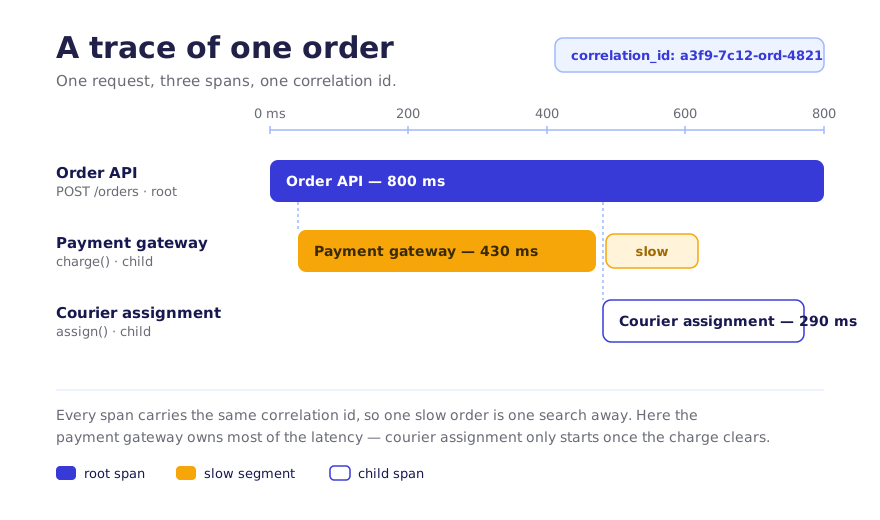
What it buys you in production: an order you can follow end to end. The order_id lets you pull every line for one failed order across the order, payment, and courier services; the trace shows you which hop was slow, the payment charge or the courier match, not just that something was. Because you're exporting OTLP, the standard wire format, you can send the same telemetry to Cloud Trace (X-Ray, Azure Monitor) and switch backends without touching the code.
Skip-if: you're a single process with no outbound calls. If the order service did everything in-process with no payment gateway and no courier worker, a correlation ID on your logs would be plenty and full tracing would be pure overhead. The moment payment and courier assignment became separate hops, the spans earned their keep.
Download the full PDF for free?
Free download — no account required