Observability & Diagnostics: Seeing Inside Production
The order service can swallow a failure so gracefully that nobody notices for hours. The payment retry succeeded on the third attempt. The breaker tripped and the fallback held while courier assignment drained a little slower than usual. No single event registers as an outage, yet together they are a service degrading toward the dinner rush it won't survive. None of that reaches you unless the service tells you, and it only tells you what you thought to make it say.
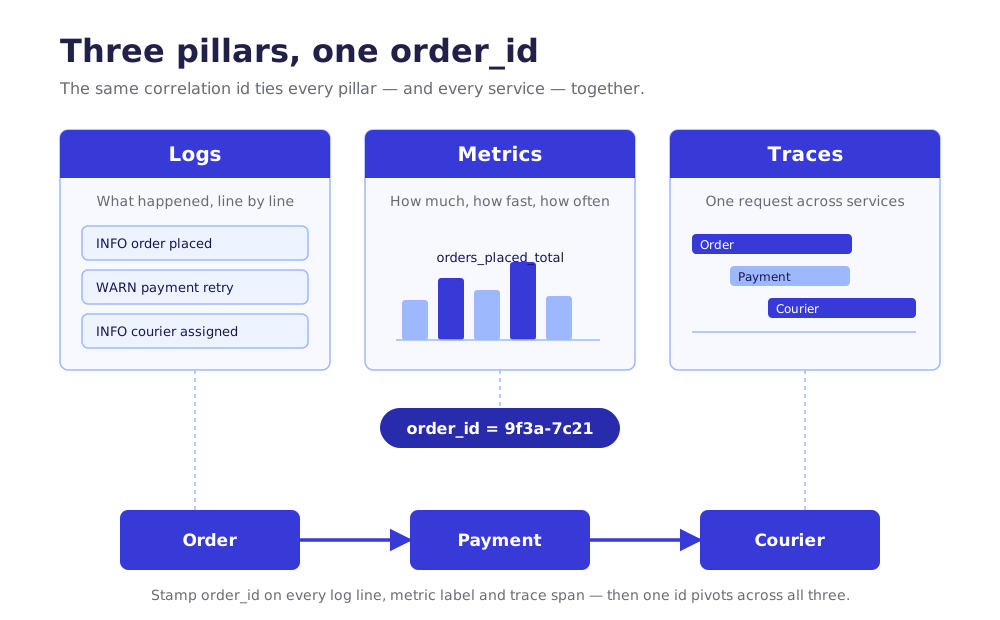
The vocabulary here is the three pillars: logs, metrics, and traces. Logs are the discrete events ("order 4471 failed payment for tenant 12"). Metrics are the aggregates ("p99 confirmation latency, last five minutes"). Traces are a single order's path across services. A handful of patterns turn those three pillars into something a small team can actually run, plus the one thing that makes all of it worth the effort: an alert that pages a human only when an objective is at risk.
Health Endpoint Monitoring
The problem: an orchestrator needs to know whether your order service container is alive and whether it's ready for traffic, and it can't tell from the outside (Azure Cloud Design Patterns). A process that's booted but still warming its connection pool will accept orders it can't write. A process wedged on a deadlock looks identical to a healthy one until you ask it.
You expose two endpoints. Liveness answers "am I running at all" and, if it fails, the orchestrator restarts you. Readiness answers "should I receive traffic right now" and, if it fails, the load balancer routes around you without a restart. Keep them separate. A slow downstream dependency should fail readiness, not liveness, or you'll get a restart loop that solves nothing.
builder.Services.AddHealthChecks()
    .AddCheck("self", () => HealthCheckResult.Healthy(), tags: ["live"])
    .AddNpgSql(ordersConnString, tags: ["ready"]);

app.MapHealthChecks("/health/live",  new() { Predicate = c => c.Tags.Contains("live") });
app.MapHealthChecks("/health/ready", new() { Predicate = c => c.Tags.Contains("ready") });
What it buys you in production: the platform heals you without a human. A wedged instance gets recycled. A warming one stops taking orders until it's ready, and a deploy that boots broken never receives a request at all. This is the contract between the order service and Cloud Run (AWS App Runner/ECS, Azure Container Apps), and it's nearly free to hold up your end.
Skip-if: you're not behind anything that reads the probes. A box you SSH into and restart by hand gets nothing from a readiness endpoint. The moment an orchestrator is in the picture, you need both.
Structured Logging
The problem: a log line written as a sentence is readable by one human and queryable by none. "Order 4471 failed payment for restaurant 12 after 2 retries" cannot be filtered, counted, or grouped without a regular expression you'll regret. At dinner rush, grep is not a search engine.
Log events, not strings. Each line carries a message template and its values as named properties, so the aggregator can index them. With Serilog the shape barely changes from what you'd write anyway, but the output is structured JSON your backend can query.
Log.Information("Order {order_id} for tenant {tenant_id} failed payment after {retries} retries",
    order.Id, order.TenantId, retryCount);
That renders as a readable line locally and as { order_id: 4471, tenant_id: 12, retries: 2 } to the sink, where you can ask "show every failed payment for tenant 12 during tonight's rush" and get an answer in seconds.
What it buys you in production: your logs become a dataset. You can filter by restaurant, count failures by type, and follow one order by its order_id instead of reading a wall of text. Push the common fields (tenant_id, order_id, environment) into the log context once and every line inside that scope carries them automatically.
A log you can query is a tool. A log you can only read is a diary.
Skip-if: nothing. Structured logging costs you a logger configuration and the discipline to use message templates instead of string interpolation. There's no version of a production service where unstructured logs are the right call. Just don't put a customer's card number or home address in a property; the audit-logging discipline below applies to ordinary logs too.
Download the full PDF for free?
Free download — no account required