The Toolkit
Boring on purpose
When you start a project like this, there's a pull toward whatever's newest. A flashy framework. A model that trended on launch day. Resist it. The agents in this book will handle real candidate data, talk to your ATS, and still be running long after the demo glow wears off. You want a stack you can find documentation for at 2am, that someone else patches for you, and that won't spring a surprise on you in eighteen months.
So we're using C# on .NET 8, with Microsoft.SemanticKernel as the agent framework. Two reasons, both commercial.
First, .NET 8 is a long-term-support release backed by Microsoft. Long-term support is exactly what you want under a tool you intend to keep: security patches and a stable runtime for years, not a framework you have to chase. It's the same platform a huge amount of serious business software already runs on, so hiring help later is easy and nobody has to learn an exotic language to keep the lights on.
Second, Semantic Kernel is Microsoft's own open-source kit for wiring large language models into normal application code. It gives us the agent machinery (function calling, the thought-action-observation loop, prompt management) without us hand-rolling it. It's vendor-neutral about which model you point it at, which matters more than it sounds. Models get deprecated. The framework shouldn't have to.
Pick the stack you can still hire for, patch, and trust in two years. Everything else is fashion.
How the project is laid out
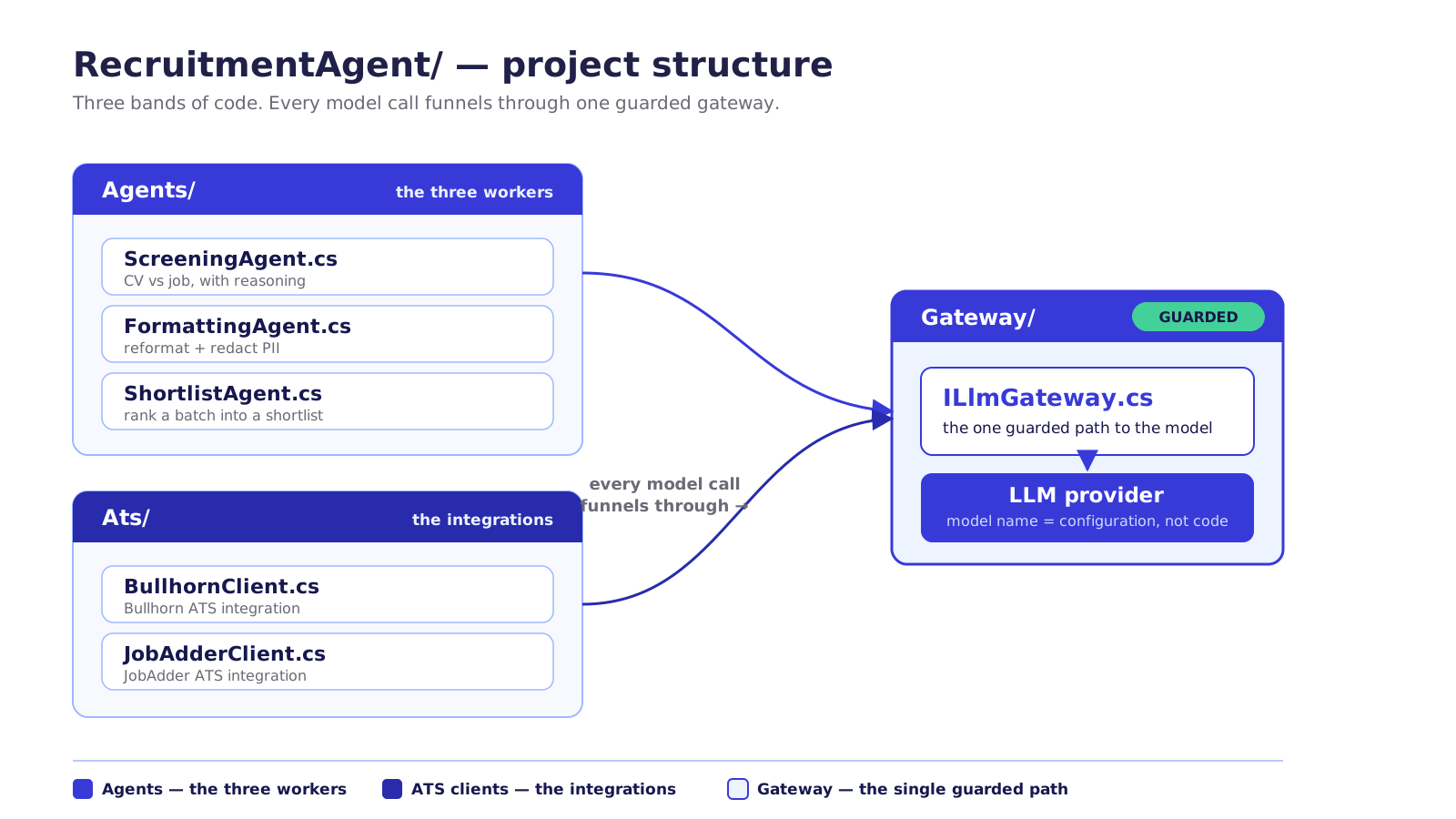
Get the shape right now and you save yourself a world of pain later. Here's the skeleton we'll build into across Part II: one container, one agency, one tidy tree.
RecruitmentAgent/
├── RecruitmentAgent.csproj      // .NET 8, references SemanticKernel
├── Program.cs                   // bootstrap: config + kernel
├── .env.example                 // template for secrets (committed)
├── .env                         // real secrets (NEVER committed)
├── Dockerfile                   // container image definition
├── Gateway/
│   └── ILlmGateway.cs           // the one guarded path to the model
├── Ats/
│   ├── BullhornClient.cs        // Bullhorn ATS integration
│   └── JobAdderClient.cs        // JobAdder ATS integration
└── Agents/
    ├── ScreeningAgent.cs        // CV vs job, with reasoning
    ├── FormattingAgent.cs       // reformat + redact PII
    └── ShortlistAgent.cs        // rank a batch into a shortlist
The three agents that do the recruiting work each get a file. The two ATSs each get a client. And there's one folder that does more work than its size suggests, Gateway/, which we'll come to in a moment, because every model call in this book passes through it.
Configuration: secrets out of the code, always
The fastest way to turn a useful tool into a headline is to commit a secret. In 2024 alone, 23.8 million secrets (API keys, passwords, tokens) were leaked into public GitHub repositories (GitGuardian, State of Secrets Sprawl 2025). The fix is not heroics. It's a discipline: secrets live in configuration, never in code, and the file that holds them never goes near version control.
We use the DotNetEnv package to load a local .env file into the application's configuration at startup, read through .NET's standard IConfiguration. In development you keep a real .env on your machine; in production the same values come from GCP Secret Manager (AWS Secrets Manager / Azure Key Vault). Same code, different source. What you do commit is a template, so the next person knows what to fill in:
# .env.example — copy to .env and fill in. NEVER commit the real .env.

# The model provider (OpenAI shown; swappable)
OPENAI_API_KEY=sk-...
OPENAI_MODEL=gpt-4o-mini

# Bullhorn ATS (YS flagship integration)
BULLHORN_CLIENT_ID=...
BULLHORN_CLIENT_SECRET=...

# JobAdder ATS (OAuth2 — tokens rotate; persist the refresh token)
JOBADDER_CLIENT_ID=...
JOBADDER_CLIENT_SECRET=...
JOBADDER_REFRESH_TOKEN=...                 # rotates on every refresh — re-save it
JOBADDER_API_BASE=https://api.jobadder.com/v2  # per-account base from token response
That .env.example is the documentation. The real .env sits in .gitignore from the first commit, and the moment you deploy, those values are pulled from a managed secret store instead of a file. (All snippets in this book are illustrative excerpts; they show the shape, not a copy-paste product.)
Download the full PDF for free?
Free download — no account required
