Monitoring & Observability
Once an AI recruitment automation is live, the question stops being what can go wrong and becomes how you'd ever know. This page is about exactly that: the monitoring and observability that let you trust a tool you've stopped watching.
Here's the trap. A demo runs while you watch it. A production tool runs while you don't, which is the entire point of it. So the moment it goes live, you've made a quiet bet: that when it breaks, or drifts, or starts scoring CVs against an empty job field, something tells you before a candidate or a client or a regulator does. Monitoring is how that bet pays off. Skip it and you don't have an automation. You have a process you've stopped watching and started hoping about.
An automation you can't see is just a rumour about work getting done.
This is the engineer's operating view: the live signals you watch to keep the thing healthy day to day. The boardroom version of this, the scorecard an owner reads to decide whether the whole thing is worth it, lives in the success-metrics scorecard. Here we're in the engine room.
The three questions monitoring must answer
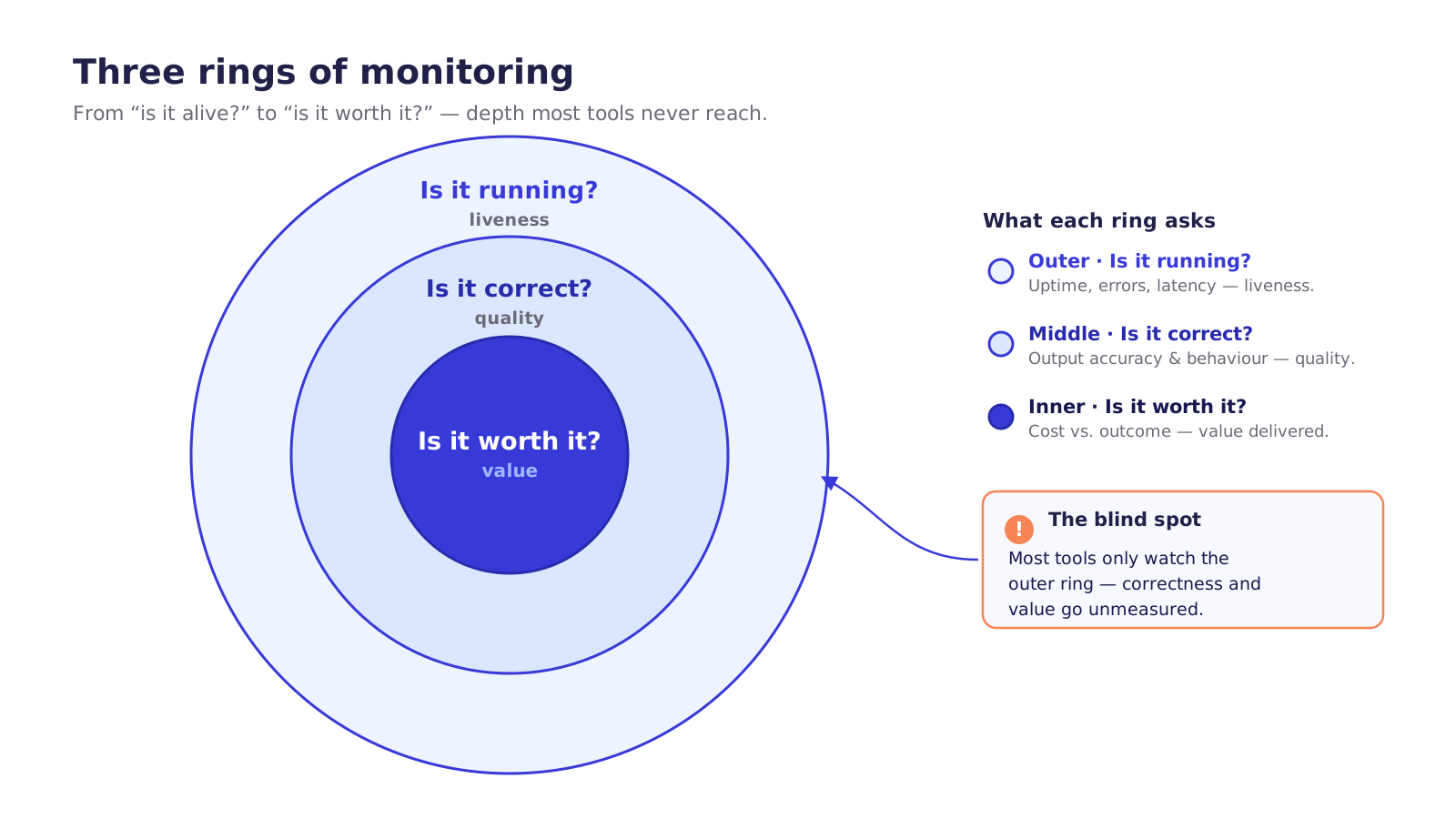
Strip away the dashboards and the jargon and monitoring answers three questions, in order of how often people forget them.
- Is it running? Liveness. Did the container come up, is it consuming work, is the ATS answering, are errors within normal bounds?
- Is it correct? Quality. The thing is running fine and still producing rubbish. A health check is green while every verdict is subtly wrong.
- Is it worth it? Value. It's running, it's correct, and it's quietly burning more in tokens than it saves in hours, or processing a tenth of the volume you assumed.
Most DIY tools answer the first, ignore the second, and have never once measured the third. That's not laziness. Question one is the only thing a generic uptime check can answer. The other two need you to know what the work actually is, which means someone has to build them in on purpose. The rest of this chapter is how you do that.
Structured logging and traceability
"It gave a weird result yesterday." That sentence is either a five-minute lookup or a lost afternoon, and the difference is whether you logged the right things at the time. You can't reconstruct a decision after the fact. You either captured the trail when it happened, or you didn't.
For any single decision you want the whole chain: which ATS event triggered it, which job and candidate it concerned (by reference, not by name, more on that in a second), the model and prompt version used, the agent's reasoning, the output, and what the human did next. Tied together by one correlation ID that follows the work from the ATS event all the way to the decision written back. Pull that ID and the entire story is in front of you.
Two libraries do the heavy lifting, and both are cloud-neutral on purpose so you're never boxed in. Serilog gives you structured logs: not strings, but records with typed fields you can filter and query. OpenTelemetry gives you distributed tracing, the timeline of every step in a run, vendor-neutral and exported to whichever cloud you're on: Cloud Logging / Cloud Trace (CloudWatch Logs + X-Ray on AWS / Azure Monitor + Application Insights). The neutrality is the point. Your traces aren't hostages to one provider's price list.
In Semantic Kernel the natural place to hook this is an IFunctionInvocationFilter. It wraps every function the agent invokes, so you get the trace for free without sprinkling logging through your business logic. (Snippets here are illustrative excerpts: the shape, not a copy-paste product.)
public sealed class TracingFilter(ILogger log) : IFunctionInvocationFilter
{
    public async Task OnFunctionInvocationAsync(
        FunctionInvocationContext ctx, Func<FunctionInvocationContext, Task> next)
    {
        using var activity = Telemetry.Source.StartActivity(ctx.Function.Name);
        var sw = Stopwatch.StartNew();
        await next(ctx);                       // run the actual function
        // SafeLog only — typed refs + versions, never raw CV text
        log.Information("fn {Fn} done in {Ms}ms corr {Corr} promptv {Pv}",
            ctx.Function.Name, sw.ElapsedMilliseconds,
            ctx.Arguments.CorrelationId(), PromptVersion.Current);
    }
}
Now the rule that makes this chapter inseparable from the security one. The trace must be useful without hoarding PII. A naive logger that dumps the full prompt and CV into Cloud Logging has just spread every candidate's personal data, and any prompt-injection payload hidden in their CV, across a system with looser access controls than your ATS. You'd have solved observability by creating a breach.
So you log references, reasoning, and versions, never raw CVs. The ATS is the system of record. The log points at candidates; it doesn't copy them. And none of this is left to good intentions. It's the same guarded log sink from the security and compliance work: a typed SafeLogEvent is the only thing the logger will accept, raw strings get refused at compile time, and a DLP pass scans whatever does get written as a backstop. You can't leak what never reaches the log path in the first place.
A good trace tells you exactly what the agent did and why, and tells you nothing you'd be sorry to leak.
What to actually watch
Logs are for forensics, answering "what happened there." Metrics are for vigilance, answering "what's happening now, across everything." These are the live operational signals you watch on a dashboard. (The business-facing version of several of these, packaged for an owner rather than an engineer, is consolidated in the success-metrics scorecard. Here we keep it operational.)
Map them straight back to the three questions.
Is it running? (liveness.) Runs started versus completed, error rate, latency (including the cold-start tax that scale-to-zero buys you), queue depth, dead-letter-queue size, and the 401/429 rates from each ATS. A climbing 401 rate means a token's expiring; a climbing 429 means you're being rate-limited into a corner; a growing DLQ means work is silently piling up where nobody's looking.
Is it correct? (quality.) This is the one DIY tools skip, and it has a single best signal: the human-override rate, how often a recruiter disagrees with the agent and changes its verdict. Sit with what that one number tells you. Low and stable means the humans and the agent agree, and the tool is earning trust. A rising override rate is the earliest warning you'll ever get that quality is slipping, long before any uptime check blinks, because nothing is technically broken. Watch it next to the percentage flagged for human review, the schema-validation failure rate, and the shape of the score distribution (a sudden spike of 90s, or everything collapsing to the middle, is a tell).
// Emitted on every decision the agent writes back
static readonly Meter M = new("Recruiter.Agent");
static readonly Counter<long> Decisions = M.CreateCounter<long>("decisions.total");
static readonly Counter<long> Overrides = M.CreateCounter<long>("human.overrides");

public void RecordHumanAction(DecisionRecord d, HumanAction a)
{
    Decisions.Add(1, new("rec", d.Recommendation));
    if (a.Disagreed)                            // human changed the verdict
        Overrides.Add(1, new("rec", d.Recommendation), new("job", d.JobRef));
}
If you only ever watch one number, watch the override rate. It's the closest thing to the agent's own report card, graded by the people who'd know.
Is it worth it? (value.) Tokens and cost per run, CVs processed, and hours saved tied back to the baseline the whole case rests on: the roughly 12 hours a week of admin a recruiter loses, the 45 CVs in about 52 seconds the agent can clear. This is where you confirm the tool is paying its way and not quietly inverting the maths.
Emission is OpenTelemetry metrics; the dashboards live in Cloud Monitoring (CloudWatch / Azure Monitor), with Prometheus/Grafana as the portable, cloud-neutral option if you'd rather own the stack. Same neutrality principle as the logs.
Alerting — "we fix it before you see it"
A dashboard nobody's looking at is just a painting. Metrics earn their keep the moment a threshold trips and someone actually gets told: at 3am, on a Sunday, in the middle of a placement push.
The thresholds worth a page: an error-rate spike, override-rate drift (quality slipping), DLQ growth (work falling through), a cost anomaly (a retry storm running up a four-figure token bill overnight), ATS auth failures, a failed silent-drift canary. Catch any of these early and you fix a problem. Miss them and you explain one.
Alert rules live in Cloud Monitoring (CloudWatch Alarms / Azure Monitor Alerts) and route to an on-call tool, PagerDuty or Opsgenie. And here the hard question surfaces, the one no diagram answers: who gets paged, and when? This is the sentence where "monitoring" stops being a dashboard and becomes someone's job at 2am. A staffing firm that builds this itself has, by accident, taken on a 24/7 software on-call rota, sustainably staffed by four to six engineers, never by the one contractor who built it and has since moved on.
This is exactly the line YS's Managed AI Automation is drawn along: 24/7 monitoring, a dedicated Slack channel, sub-2-hour response. We fix problems before you see them. Not because the alerting is clever, but because someone whose actual job is running software is the one holding the pager. That's not a feature you can buy off a shelf. It's a function you either staff or outsource.
The goal of alerting isn't to tell you it broke. It's that you hear about it from your engineer, not your client.
Quality monitoring and drift detection
Here's the subtle one, the failure that doesn't trip a single one of the alerts above. The model didn't change. The world did.
A new CV template comes into fashion. A client starts hiring for a role type you've never screened before. A candidate pool shifts. Nothing is broken, no error, no 429, no exception, and yet the agent's quality is quietly eroding because reality has drifted away from the cases it handles well. This is drift, and you only ever catch it by watching outputs over time, never in any single run.
Two practices catch it. The first is passive: sample a slice of the agent's outputs for human spot-checks, and track the score and decision distributions for shifts (the score-distribution metric covered earlier is your tripwire). The second is active and, frankly, the one that matters most: a golden set, a fixed bundle of CV-and-job pairs with known-correct verdicts, re-run on a schedule, so you can prove the agent still scores today the way it scored when you trusted it.
You run it on a timer, Cloud Scheduler + Cloud Run Jobs (EventBridge + Lambda / Azure Functions timer), not in the hot path. Cheap, regular, and the regression alarm for everything downstream.
public async Task<EvalReport> RunGoldenSetAsync(GoldenSet gold)
{
    var report = new EvalReport(PromptVersion.Current, Model.Current);
    foreach (var (caseId, expected) in gold.Cases)
    {
        var actual = await gateway.InvokeAgentAsync(  // same guarded path as prod
            kernel, ScreeningInstructions, gold.InputFor(caseId), Settings);
        report.Add(caseId, expected, actual);          // agreement + drift delta
    }
    if (report.AgreementRate < gold.Threshold)         // e.g. < 0.95
        alerts.Raise("golden-set regression", report); // page, don't ship
    return report;
}
Notice the eval runs through the same guarded ILlmGateway as production: you're testing the real path, not a parallel one that skips the allowlist and DLP checks. And the golden set isn't only a monitor. It's the gate that makes ongoing maintenance possible: when a model gets deprecated or a prompt needs editing, this harness is what tells you whether the change is safe to ship. A green golden set is permission to move. A red one is a held door.
Drift is the failure that waits until you've stopped watching. The golden set is how you keep watching after you've stopped paying attention.
That's the whole watch. Traces that explain without exposing. Live metrics anchored on the override rate. Alerts that reach an engineer before they reach a client. A scheduled eval that catches the slow slide nobody else would. Get it right and you earn the prize this chapter opened with: an automation you can mostly forget about. Get it wrong, or skip it, and what you've actually got is a confident black box going wrong in the dark, with no one watching the room.
And every safeguard in these last three chapters has assumed one thing stays still: the model, the ATS, the libraries underneath. They won't. Which is the whole of what comes next.
Next: Maintenance & the Lifecycle. What it takes to keep all of this running once the ground starts moving under it.
Download the full PDF for free?
Free download — no account required
