Talking to Your ATS
An agent that can't read your ATS is a clever toy. An agent that can read it but can't write back is a search box with extra steps. The whole point of the cog is that it finishes the job: it pulls the job spec and the candidate, does the work, and leaves a note in the system where your consultant will actually see it. That round trip (read, reason, write) is what this page is about: how an AI agent authenticates against Bullhorn and JobAdder, reads jobs and candidates, and writes a decision back without losing its session.
We're building against two systems of record: Bullhorn first, because it's the YS flagship and the one most of you run, then JobAdder. The shapes are similar. The plumbing is not. Both make you earn a session before you touch a single record, and both will quietly expire that session out from under you if you stop paying attention. Get the connection right and everything downstream is easy. Get it wrong and you've got an agent that works beautifully on Friday and throws 401s on Monday.
The hard part of talking to an ATS isn't the talking. It's staying logged in.
One rule before any code: every snippet here is an illustrative excerpt, not a copy-paste product. Real endpoints, real method names, boilerplate elided with // …. And every call that touches the model still routes through the guarded ILlmGateway, the one door every model call goes through. The ATS client never talks to an LLM directly. It fetches structured facts; the gateway decides what's allowed to leave the building.
Bullhorn: three doors before you're in
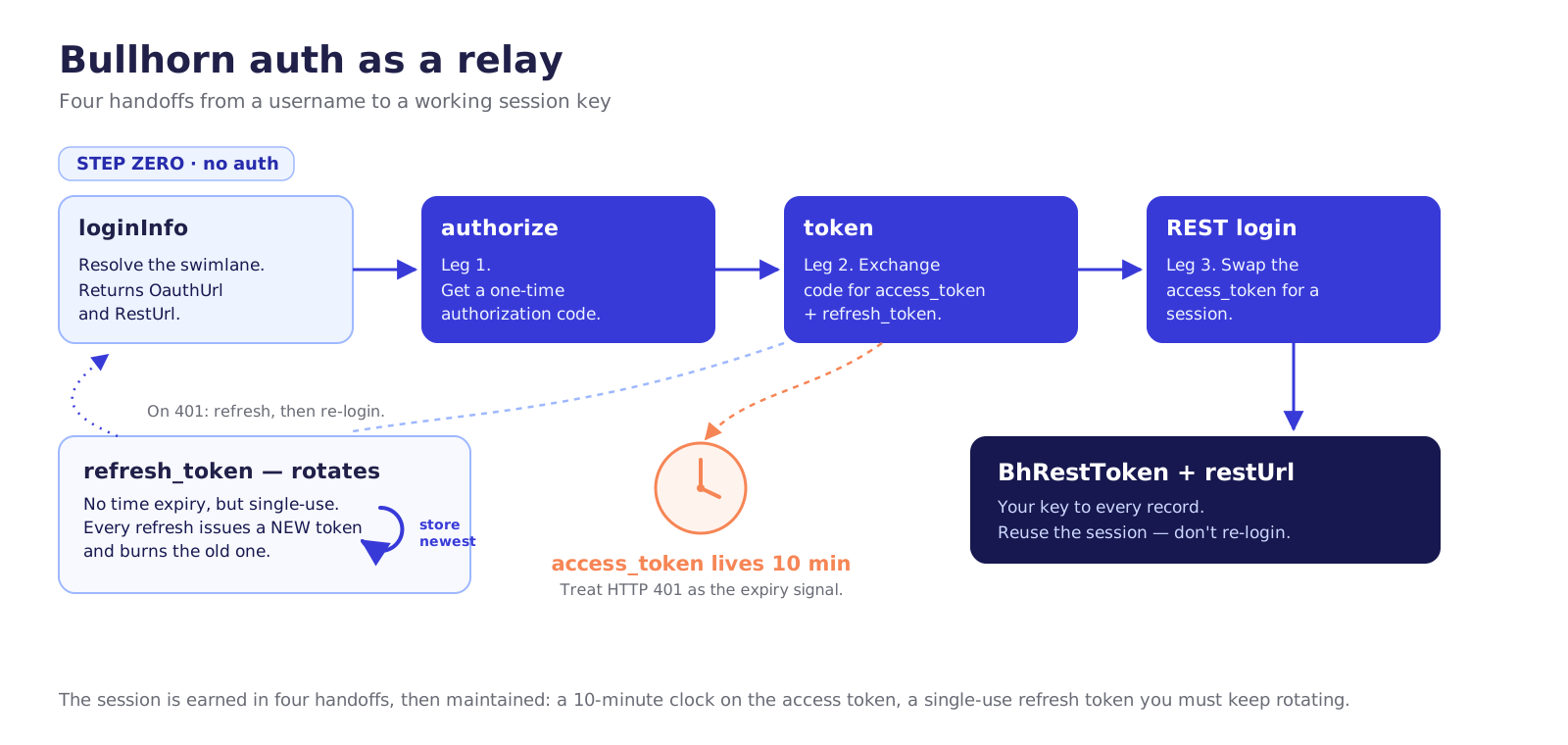
Bullhorn's REST API is three-legged, and there's a step zero on top of that. You don't get a single API key and start making calls. You authenticate, you swap that for a session, and, crucially, you first ask Bullhorn which servers you're even allowed to talk to. Bullhorn runs regional data centres it calls swimlanes (west, east, emea, and so on), and your hosts depend on yours. Hardcode a host and you'll connect for months, then break the day a client gets migrated.
So step zero is a lookup, no auth required:
// Illustrative excerpt. Resolve the user's swimlane FIRST — never hardcode hosts.
var info = await http.GetFromJsonAsync<LoginInfo>(
    "https://rest.bullhornstaffing.com/rest-services/loginInfo" +
    $"?username={apiUsername}");
// info.OauthUrl  -> https://auth-{dc}.bullhornstaffing.com/oauth
// info.RestUrl   -> https://rest-{dc}.bullhornstaffing.com/rest-services
Now the three legs. Authorize to get a one-time code, exchange that code for tokens, then log in to swap the access token for a session. The end state we actually care about is a BhRestToken and a restUrl. That pair is your key to every record in the system.
// Illustrative excerpt. Leg 2 (token) and leg 3 (REST login), post-authorize.
var token = await http.PostAsJsonAsync($"{oauthUrl}/token" +
    $"?grant_type=authorization_code&code={authCode}" +
    $"&client_id={id}&client_secret={secret}&redirect_uri={uri}", null);
// -> { access_token, refresh_token, expires_in }  | access_token lives 10 minutes

var login = await http.PostAsync($"{restUrl}/login" +
    $"?version=2.0&access_token={token.AccessToken}", null);
// -> { BhRestToken, restUrl }
// restUrl = https://rest{N}.bullhornstaffing.com/rest-services/{corpToken}/
// corpToken is baked into restUrl — read it, don't hardcode it.
A few things to internalise here, because they're where DIY builds quietly rot. The access token lives ten minutes. The refresh token doesn't expire by time, but it rotates: every refresh hands you a new one and burns the old, so you persist the newest single-use token or you lock yourself out. And the BhRestToken session is meant to be reused: Bullhorn's own docs tell you not to log in fresh on every request, for load reasons. You hold the session, and you treat an HTTP 401 as the signal it's expired, then you refresh and re-login. That's not an optimisation; it's how the system expects to be used.
Reading a job and a candidate
With restUrl and BhRestToken in hand, the records are straightforward, with one gotcha that catches everyone: you must ask for fields. No fields= (or layout=), no result. Bullhorn returns a 404 rather than guessing what you wanted.
// Illustrative excerpt. fields= is REQUIRED — omitting it returns 404.
var job = await http.GetAsync($"{restUrl}entity/JobOrder/{id}" +
    $"?fields=id,title,status,clientCorporation,employmentType" +
    $"&BhRestToken={bhRestToken}");

var candidate = await http.GetAsync($"{restUrl}entity/Candidate/{id}" +
    $"?fields=id,firstName,lastName,email,status,occupation" +
    $"&BhRestToken={bhRestToken}");
This is also the first place least privilege earns its keep. The screening agent needs JobOrder, Candidate, and fileAttachments read access, plus Note write. It does not need to update placements, delete records, or read commission data. Scope the API user to exactly that, and a prompt-injected CV that tries to talk your agent into deleting a record simply can't. The credential won't allow it. Don't rely on the agent behaving. Rely on the door being locked.
The CV itself
The job and candidate records are metadata. The CV is a file attachment, and Bullhorn handles it in two moves: list the attachments, then download the one you want. Note isResume: that's how you find the actual CV among the offer letters and ID scans.
// Illustrative excerpt. List attachments, then pull the resume by id.
var files = await http.GetAsync($"{restUrl}entity/Candidate/{id}/fileAttachments" +
    $"?fields=id,name,contentType,isResume,dateAdded&BhRestToken={bhRestToken}");
// download one -> { File: { name, contentType, fileContent (base64) } }
var file = await http.GetAsync($"{restUrl}file/Candidate/{id}/{fileId}" +
    $"?BhRestToken={bhRestToken}");
If you'd rather have parsed, plain-text CV content than wrangle a base64 blob, Bullhorn's resume parser will do it: POST {restUrl}resume/parseToCandidate with the file as multipart, and &populateDescription=text to get the body back as plain text. There's no separate convert-to-text endpoint; the text rides along in the description. Full listings for both paths are in the fuller code listings.
Writing a decision back
This is the half most "AI tools" skip, and it's the half that matters. A screen that doesn't land in the system of record is a screen your consultant never sees. The leash lives here too: the agent writes a note, a triage with its reasoning attached, and a human reads it and decides. We don't let the agent flip a candidate's status to Placed on its own.
// Illustrative excerpt. Create a Note (PUT). Updating a field is POST.
await http.PutAsJsonAsync($"{restUrl}entity/Note?BhRestToken={bhRestToken}", new {
    action = "AI Screen",
    comments = screenResult.Summary,   // visible reasoning, human reads it
    personReference = new { id = candidateId },
    jobOrder = new { id = jobId }
});
// -> { changedEntityId, changeType: "INSERT" }
// A status change would be: POST entity/Candidate/{id} { status = "..." } — human only.
The agent writes the note. The human writes the outcome.
Search, pagination, and read-after-write
Two ways to find records, and the difference bites people. search/ runs against a Lucene full-text index. It's powerful (you can even search inside CV text), but eventually consistent: a record you just wrote may not show up for a moment. query/ runs JPQL straight against the database, strongly consistent, so it's what you use when you need to read something back immediately after writing it. Pick search for discovery, query for read-after-write.
Both paginate the same way: start (offset, default 0) and count (page size, default 20, capped per endpoint, often up to 500). You loop start += count until you've consumed total. And on a 429, Bullhorn's guidance is plain: wait a second and retry, repeating until it takes. Bullhorn does publish a limit, 1,500 requests per minute, scoped to your OAuth client ID, but you don't manage to it; you implement backoff with Polly and let the 429 tell you when you've hit it. Backoff and circuit-breakers get the full treatment in the reliability work. For now, know that the limit exists and the client must respect it.
On sandbox versus production: Bullhorn doesn't run one public sandbox you can self-serve. You request a test corp from Bullhorn, and it comes with its own credentials and its own swimlane, which is exactly why step zero resolves the host from loginInfo instead of assuming one. Test and prod are different corps, not a flag you flip.
JobAdder: one token, but the base URL is handed to you
JobAdder is the second integration, and its auth is cleaner than Bullhorn's: a textbook OAuth2 authorization-code flow with a single bearer token. The twist that trips people up isn't the token; it's the base URL. JobAdder doesn't want you calling api.jobadder.com directly. The token response hands you a per-account api URL, and that's the host you prefix every call with. Hardcode the documented base and you'll work in testing and break for the account that lives on a different shard.
No partner gate here. You self-register an application at developers.jobadder.com/register and get a client_id and client_secret. Auth runs against JobAdder's identity host, id.jobadder.com. You send the user to authorize, get a one-time code back (valid five minutes), and swap it for tokens.
// Illustrative excerpt. Leg 1: send the user to authorize, get a code back.
// GET https://id.jobadder.com/connect/authorize
//   ?response_type=code&client_id={id}&redirect_uri={uri}
//   &scope=read write offline_access read_candidate write_note&state={state}

// Leg 2: exchange the code for tokens (auth code valid ~5 min).
var token = await http.PostAsync("https://id.jobadder.com/connect/token",
    new FormUrlEncodedContent(new Dictionary<string,string> {
        ["grant_type"]    = "authorization_code",
        ["client_id"]     = clientId,
        ["client_secret"] = clientSecret,
        ["code"]          = authCode,
        ["redirect_uri"]  = redirectUri
    }));
// -> { access_token, expires_in: 3600, token_type: "Bearer",
//      refresh_token, api: "https://api.jobadder.com/v2" }
// Persist the `api` base URL WITH the tokens. Prefix every call with it.
Two details to internalise. The access token lives ~60 minutes (expires_in: 3600). And the refresh token rotates, exactly like Bullhorn, so every refresh hands you a new refresh token alongside the new access token, and you persist the newest one or you lock yourself out. Refreshing also returns a fresh api base URL; take it. Note that refresh only works if you asked for the offline_access scope up front.
// Illustrative excerpt. Refresh before the hour. A NEW refresh_token comes back — store it.
var refreshed = await http.PostAsync("https://id.jobadder.com/connect/token",
    new FormUrlEncodedContent(new Dictionary<string,string> {
        ["grant_type"]    = "refresh_token",
        ["client_id"]     = clientId,
        ["client_secret"] = clientSecret,
        ["refresh_token"] = storedRefreshToken
    }));
// -> { access_token, refresh_token (NEW — rotates), api }  persist both.
Every call after that carries one header: Authorization: Bearer {access_token}. The scopes you request gate what the token can do: read, write, offline_access, plus fine-grained ones like read_job, read_candidate, and write_note. That's least privilege built into the grant: ask for exactly the screening agent's needs and nothing more.
Reading and writing in JobAdder
The operations mirror Bullhorn, with JobAdder's own vocabulary. A candidate is a candidate; a job is a job. Everything hangs off the api base URL you stored at auth time, never a hardcoded host.
// Illustrative excerpt. `api` is the base URL from the token response.
var job = await http.GetAsync($"{api}/jobs/{jobId}");
// job requirements live in job.skillTags.tags (a JobOrderSkillTags object), not /skills.

var candidate = await http.GetAsync($"{api}/candidates/{candidateId}");
// -> { firstName, lastName, email, skillTags[], education[], ... }
The CV is an attachment, and JobAdder splits it the same two ways Bullhorn does: list, then download. Filter the list to the resume and ask for the latest.
// Illustrative excerpt. List resume attachments, then pull the file (raw binary).
var files = await http.GetAsync(
    $"{api}/candidates/{candidateId}/attachments?type=Resume&latest=true");
// -> [ { attachmentId, type, category, fileName, fileType }, ... ]
var file = await http.GetAsync(
    $"{api}/candidates/{candidateId}/attachments/{attachmentId}"); // raw binary
One honest gap: JobAdder has no parsed-resume-text endpoint. You download the file and parse it yourself, or, if you only need to match keywords, JobAdder will search inside the latest resume for you via GET /candidates?keywords=.... There's no server-side "give me the CV as plain text," so the screening agent owns the extraction step.
Writing a decision back follows the same leash discipline, and here JobAdder is blunt about it: there's no separate "activity" resource at all. Activities are modelled as notes. So the agent posts a note against the candidate (or the job), and a human owns the outcome. A status change is a different call entirely (PUT /candidates/{id}/status), human only.
// Illustrative excerpt. Create a note — `text` is required. Activities = notes here.
await http.PostAsJsonAsync($"{api}/candidates/{candidateId}/notes", new {
    text = screenResult.Summary,   // visible reasoning, human reads it
    // type / applicationId / reference are optional
});
// -> 201 NoteModel.  POST /jobs/{jobId}/notes works the same way.
// A status change would be: PUT /candidates/{id}/status — human only.
Listing and pagination are uniform across the API: GET /candidates and GET /jobs take offset and limit (limit caps at 1000; limit=0 returns just the totalCount). The response is an envelope, { items: [...], totalCount, links: { first, prev, next, last } }, and the clean way to page is to follow links.next until it's gone rather than computing offsets yourself.
// Illustrative excerpt. Prefer following links.next over hand-rolling offsets.
var page = await http.GetFromJsonAsync<Page<Candidate>>(
    $"{api}/candidates?offset=0&limit=200");
// while (page.Links.Next is not null) page = await http.GetFromJsonAsync(page.Links.Next);
On rate limits: JobAdder applies API throttling, but the exact numbers live behind its Zendesk help centre and aren't public, so don't code to an invented figure. Consult JobAdder's API Throttling guide (or email api@jobadder.com), and implement 429 backoff defensively with Polly regardless, exactly as on the Bullhorn side. And sandbox versus prod: there's no separate sandbox host. You register a separate Test application at developers.jobadder.com/register (its own client_id and client_secret) and connect a test account to it. Because the api base URL is handed to you per account at auth time, test and prod naturally resolve to the right place.
What both integrations have in common
Strip away the vocabulary and the two systems teach the same lesson. Authentication isn't a key you keep. It's a session you earn and then maintain: a short-lived token on a clock, a refresh token you must not fumble, an expiry you detect and recover from with no human in the loop. Reads are cheap once you're in. Writes are where the leash lives: the agent leaves a note with its reasoning, and a person makes the call. Both will throttle you and paginate you. Both want a separate test environment, a test corp you request from Bullhorn, a test application you self-register with JobAdder.
None of this is hard to build. It's a few hundred lines of well-behaved HTTP. The hard part, the part that separates the weekend build from the system that's still running in two years, is that all of it drifts. Tokens rotate. Swimlanes migrate. Endpoints get versioned. A refresh that worked yesterday returns invalid_grant today because someone re-ran an old auth code. The integration isn't a thing you write once; it's a thing you keep alive. That's the through-line of running it for years, and it's where the real work lives.
Connecting to your ATS takes an afternoon. Staying connected takes an owner.
With the connection in place, the next step is pointing it at real work: scoring one CV against one job, with the reasoning on show.
Download the full PDF for free?
Free download — no account required
